Data Engineering Path · Airflow

Common Pitfalls & How to Avoid Them
⚠️ Mistakes Every Airflow Developer Makes (And How to Fix Them)
Pitfall 1: Processing Data in Workers
# ❌ BAD — Worker runs out of memory
@task()
def process():
    df = pd.read_parquet("s3://bucket/100gb_file.parquet")
    result = df.groupby("category").agg({"amount": "sum"})
    result.to_parquet("s3://bucket/output.parquet")

# ✅ GOOD — Delegate to Spark
@task()
def process():
    spark_submit("--class com.company.Transform s3://jars/transform.jar")
Pitfall 2: Top-Level Code in DAG Files
# ❌ BAD — This runs every time the scheduler parses the file!
import requests
response = requests.get("https://api.example.com/config")  # Called every 30 seconds!
config = response.json()

with DAG(...) as dag:
    ...

# ✅ GOOD — Move to inside a task
@task()
def get_config():
    import requests
    response = requests.get("https://api.example.com/config")
    return response.json()
Pitfall 3: Huge XCom Values
# ❌ BAD — Pushing 50 MB DataFrame to XCom
@task()
def extract():
    return pd.read_csv("huge_file.csv").to_dict()  # Stored in metadata DB!

# ✅ GOOD — Store data externally, pass reference
@task()
def extract():
    df = pd.read_csv("huge_file.csv")
    path = "s3://staging/extracted_data.parquet"
    df.to_parquet(path)
    return {"path": path, "rows": len(df)}  # Only metadata in XCom
Pitfall 4: No Catchup=False
# ❌ BAD — start date is 2020, no catchup control
with DAG("my_dag", schedule="@hourly", start_date=datetime(2020, 1, 1)):
    # Airflow creates 35,000+ DAG Runs!

# ✅ GOOD — Explicit catchup=False
with DAG("my_dag", schedule="@hourly", start_date=datetime(2024, 1, 1), catchup=False):
    # Only creates runs from now onwards
Pitfall 5: Hardcoded Secrets
# ❌ BAD — Credentials in code (visible in source control!)
hook = PostgresHook(host="db.company.com", login="admin", password="s3cr3t!")

# ✅ GOOD — Use Airflow Connections
hook = PostgresHook(postgres_conn_id="production_warehouse")
# Credentials stored encrypted in Airflow metadata DB
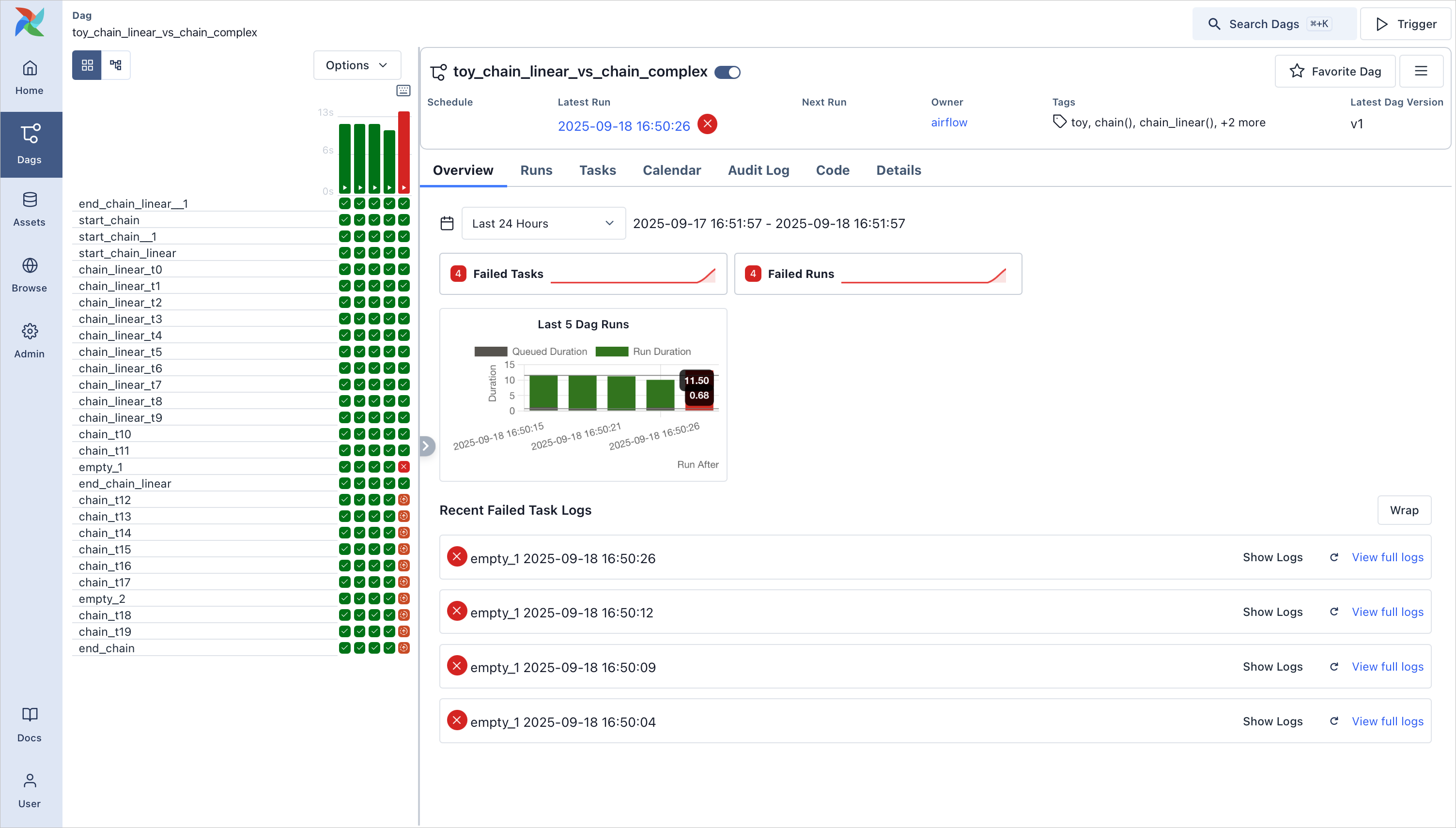
Pitfall 6: Ignoring UI Error Diagnostics & Failed Task Overview
When complex DAGs fail in production, do not try to read unstructured scheduler logs from terminal. Instead, always use the Web UI's Grid Overview with quick links to failed tasks to instantly triage root causes and monitor pipeline status:
📘 See Also
For a comprehensive list of best practices, refer to the official Airflow documentation: Best Practices Guide
For a comprehensive list of best practices, refer to the official Airflow documentation: Best Practices Guide